
Find information inside PDFs, reports, procedures, policies, archives and internal files.

Solutions
AI document search
Doclarity helps teams search across trusted document libraries, ask questions in natural language, and get sourced answers from their own files.
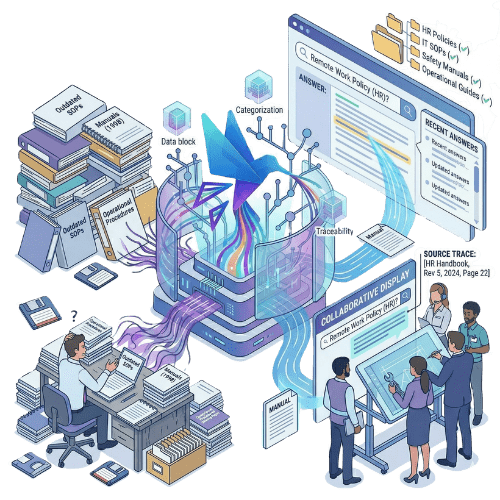
Find information inside PDFs, reports, procedures, policies, archives and internal files.
Use plain language instead of guessing the exact keyword or file name.

Trace answers back to the documents and passages used to produce them.
Why it matters
Most teams already have the documents they need: reports, policies, SOPs, procedures, manuals, meeting notes, quality records, research files or PDF archives. The problem is not the lack of documents. The problem is finding the right information inside them. Keyword search often depends on knowing the exact term. Folder structures break down as document libraries grow. Long PDFs are slow to scan manually. And when information is spread across several files, producing a reliable answer becomes even harder.
Doclarity lets teams create controlled document libraries and search them with AI. Users can ask questions in natural language, retrieve relevant passages, verify sources and turn research into notes, summaries or working documents. Instead of searching only for files, your team can search for answers inside the documents it already trusts.
Capabilities
Find relevant content by meaning, not only by exact keyword.
Combine semantic relevance, keyword search and filters to improve retrieval.
Generate answers based on your document library, with links back to the source material.
Search inside long PDFs, reports, procedures and document archives.
Ask questions across several files and bring related evidence together.
Open the original document to verify the passages used in an answer.
Turn search results into notes, summaries, responses or structured drafts.
Organize document research by team, project, topic or use case.
Keep document visibility aligned with user, team and workspace permissions.
| Need | Shared drives | Traditional search | Doclarity |
|---|---|---|---|
| Store files | Yes | Yes | Yes |
| Organize documents | Limited | Yes | Yes |
| Search by exact keyword | Limited | Yes | Yes |
| Search by meaning | No | Rarely | Yes |
| Ask questions to documents | No | Rarely | Yes |
| Search across multiple PDFs | Limited | Variable | Yes |
| Get a sourced answer | No | Rarely | Yes |
| Verify source passages | Limited | Limited | Yes |
| Summarize multiple documents | No | No | Yes |
| Create a note from sources | No | No | Yes |
Doclarity does not replace every document management tool. It adds an intelligence layer for teams that need to search, understand, verify and use the information inside their documents.
Employees need to find reliable answers inside policies, procedures, reports or reference documents.
Teams need to understand what a collection of documents says about a topic.
Quality teams need to retrieve procedures, evidence, records, ISO documents or audit materials faster.
Important knowledge is trapped inside long PDFs, appendices, reports or archives.
Teams need faster answers from manuals, SOPs, instructions or internal documentation.
Users need to turn source material into summaries, memos, responses or structured drafts.
Workflow
Add PDFs, DOCX files, reports, SOPs, procedures, policies, archives or internal reference documents.
Structure documents by workspace, team, topic, source, project or access level.
Search in natural language. Doclarity retrieves relevant passages from the documents the user can access.
Review the files and passages used to support an answer before relying on it.
Use AI Write to turn search results into summaries, answers, notes or structured drafts.
Use cases
Ask a question and find the relevant policy or procedure without browsing folders manually.

Look across multiple reports to understand what they say about a topic, risk, project or decision.
Make old reports, publications, manuals or scanned document collections easier to reuse.

Use internal documents to prepare a response that can be checked against the source files.
Find procedures, evidence, records, ISO documents or audit materials faster.
Turn several documents into a clear summary, memo or working note.
Teams
Doclarity is less suited if your main need is only file storage, electronic signature, invoice dematerialization, legal archiving or a full document lifecycle workflow system.
 PDFs; reports; SOPs; internal policies; procedures; manuals; quality documents; audit evidence; research files; regulatory or reference documents; archives; documents that need to be cited, checked or summarized.
 FAQ
AI document search uses language models and retrieval systems to help users find information inside document collections. Instead of relying only on exact keywords, users can ask questions in natural language and retrieve relevant passages from their files.
Keyword search depends heavily on the exact words used in a document. Doclarity adds semantic search, natural-language questions, sourced answers and multi-document analysis.
Yes. Doclarity can work with PDFs and other document formats. The quality of search depends on the quality of the files and the extracted text.
Yes. Doclarity is designed to work from controlled document libraries. Answers are generated from the documents available to the user.
Yes. Doclarity aims to connect answers back to the documents and passages used, so users can review the source material.
Not necessarily. Doclarity can complement an existing document management system by adding AI search, sourced answers and document-based writing.
Yes. Doclarity is useful for teams that need to search procedures, quality documents, policies, evidence, audit records or internal reference documents.
Doclarity is designed for private document intelligence workflows. Your documents are used to answer questions within your controlled libraries, not as generic public web sources.
Solutions
Your documents already contain valuable answers. Doclarity helps your team find them, verify them and turn them into useful work.
 Private Secure Sovereign