Help employees find the right SOP, instruction or policy without browsing folders manually.

Solutions
Standard operating procedure software
Doclarity helps teams turn SOPs, procedures, manuals and work instructions into searchable, source-grounded libraries that employees can query, verify and reuse.
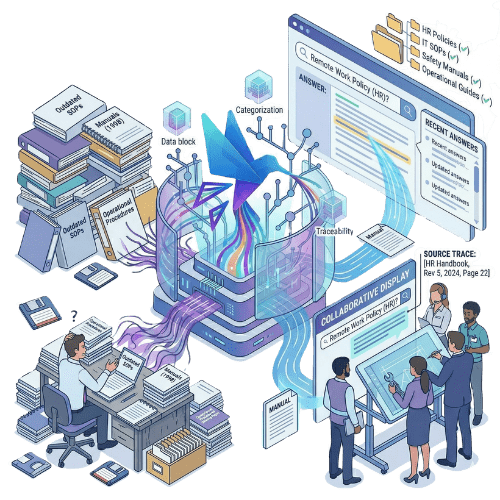
Help employees find the right SOP, instruction or policy without browsing folders manually.
Answer operational questions from approved procedures and show the documents behind the answer.

Turn SOPs into summaries, checklists, onboarding notes and working drafts.
Why it matters
Most organizations already have standard operating procedures. They may live in PDFs, Word documents, shared folders, SharePoint libraries, quality systems, manuals or internal knowledge bases. The issue is not always documentation. The issue is usability. Employees may not know which procedure applies. New hires may ask colleagues instead of searching. Managers may struggle to confirm whether a step is still current. Quality teams may need to prove which instruction supports a process. And when procedures are long, duplicated or scattered across systems, the SOP library becomes difficult to trust.
Doclarity turns SOPs and related documents into controlled AI-searchable libraries. Users can ask questions in plain language, retrieve the relevant procedure, verify the source and turn the result into a checklist, note or working document. The goal is not just to store SOPs. The goal is to make procedures easier to find, understand and apply.
Capabilities
Organize procedures, work instructions, manuals, policies and reference documents by team, process, site or role.
Let users ask what to do in a situation instead of guessing the exact SOP title or keyword.
Find the right procedure even when different documents use different wording.
Generate answers that point back to the SOPs, manuals or policies used.
Open the source document and check the exact passage before using an answer.
Combine related SOPs, policies, forms and manuals to answer operational questions.
Turn procedure research into checklists, onboarding guides, summaries or draft instructions.
Create SOP workspaces for teams, departments, sites, processes or projects.
Keep sensitive procedures visible only to the right users or teams.
| Need | Shared folders | Knowledge base | QMS software | Doclarity |
|---|---|---|---|---|
| Store SOP files | Yes | Limited | Yes | Yes |
| Organize procedures by process | Limited | Yes | Yes | Yes |
| Search by SOP title or keyword | Limited | Yes | Yes | Yes |
| Search by meaning | No | Variable | Variable | Yes |
| Ask a question to SOPs | No | Variable | Rarely | Yes |
| Get a sourced answer | No | Rarely | Variable | Yes |
| Verify the exact procedure passage | Limited | Variable | Yes | Yes |
| Compare related procedures | No | Rarely | Variable | Yes |
| Create checklists or summaries | No | Variable | Rarely | Yes |
| Control access by team or role | Limited | Variable | Yes | Yes |
Doclarity is not a full QMS replacement. It does not try to manage every quality workflow, CAPA process or approval chain. It helps teams search, understand, verify and reuse the content inside their SOPs and procedure libraries.
Instead of asking a colleague or searching folders, they ask a question and find the relevant SOP.
The manager can check what the documented procedure actually says before making a decision.
The team retrieves procedures, related documents and source passages to support audit preparation.
Users can search across manuals, SOPs and instructions without reading every page manually.
The team can find related SOPs, compare context and prepare a draft update from existing sources.
A long procedure can be turned into a shorter working checklist while keeping the source available for verification.
Workflow
Add procedures, manuals, work instructions, policies, forms, guides or quality documents.
Organize documents by process, role, team, site, department, product or access level.
Users ask what applies in a given situation. Doclarity retrieves relevant passages from accessible documents.
Open the SOP or source document to confirm the exact wording and context.
Turn the source material into summaries, onboarding notes, checklists or draft updates.
Use cases
An employee asks a practical question and retrieves the relevant procedure or instruction.

New hires can ask questions to a controlled procedure library instead of relying only on colleagues.
Turn long SOPs into task-oriented checklists or step summaries for internal use.

Help managers and operators understand what the documented process says about a situation.
Find the procedure, policy or evidence needed to justify how a process is supposed to work.
Compare SOPs, manuals and policies to identify overlaps, gaps or conflicting instructions.
Teams
Doclarity is less suited if your main need is a full QMS platform for CAPA, non-conformance workflows, electronic signatures, formal approval routing or regulated document lifecycle management. It can complement those systems by making SOP content easier to search and use.
 SOPs; work instructions; procedure manuals; internal policies; process documentation; quality documents; audit evidence; training documents; onboarding guides; site-specific instructions; operational manuals; documents that employees must find, verify and apply.
 FAQ
SOP software helps organizations create, organize, manage or use standard operating procedures. Depending on the tool, it may focus on storage, approvals, versioning, training, workflow management or search.
Traditional SOP software often focuses on document control, approvals and workflow. Doclarity focuses on making SOP content searchable, answerable and reusable with AI-powered search, sourced answers and document-based writing.
Yes. Doclarity allows users to ask natural-language questions to a controlled SOP library and retrieve relevant information from accessible documents.
Yes. Doclarity aims to connect answers back to the documents and passages used so users can verify the source before relying on the answer.
Doclarity can help draft, summarize or restructure content from existing source documents. It should not replace internal review, approval or quality control for official SOPs.
Not necessarily. Doclarity is not a full QMS for CAPA, non-conformance workflows or regulated approval processes. It can complement a QMS by making SOPs and related documents easier to search and use.
Yes. New employees can use Doclarity to ask questions, find procedures, understand instructions and generate onboarding notes from approved documents.
Doclarity can work with PDFs, DOCX files, manuals, policies, procedures, work instructions and other document formats depending on ingestion and extraction quality.
Solutions
Your SOPs should not sit unread in folders. Doclarity helps your team search procedures, verify sources and turn documented knowledge into usable work.
 Private Secure Sovereign