Organize procedures, policies, SOPs, quality records, audit evidence and internal reference documents in structured libraries.

Solutions
Controlled document management
Doclarity helps teams organize controlled documents, search approved libraries, verify sources and turn procedures, policies, records and evidence into usable work.
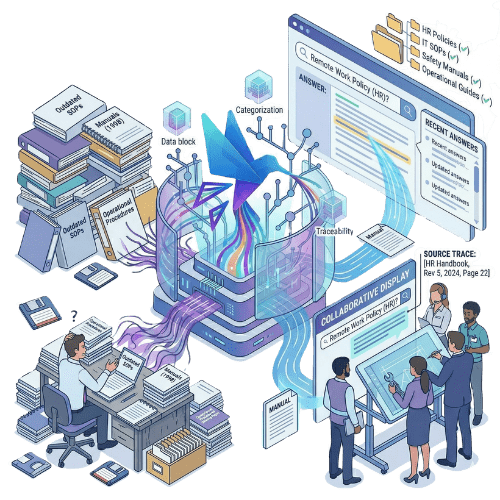
Organize procedures, policies, SOPs, quality records, audit evidence and internal reference documents in structured libraries.
Users search only the documents they are allowed to access, by workspace, team or document scope.

Answers stay connected to the documents and passages used, so teams can check the source before relying on them.
Why it matters
Controlled documents are meant to create consistency. They define how work should be done, which procedures apply, what evidence supports a process and which version should be trusted. But in practice, controlled documents often become difficult to use. Procedures sit in folders. Policies live in PDFs. Quality records are spread across teams. Older versions remain in circulation. Employees ask colleagues instead of checking the source. Audit preparation becomes a hunt for documents, passages and proof. The result is not just wasted time. It is uncertainty: is this the right document, the right version, the right evidence and the right source?
Doclarity helps teams create controlled document libraries that can be searched, questioned and verified. Users can search by meaning, ask natural-language questions, retrieve relevant passages, open the source document and turn the result into a summary, answer, checklist or working draft. Doclarity does not replace formal document control governance. It makes controlled documents easier to find, understand and use.
Capabilities
Create structured spaces for procedures, policies, SOPs, manuals, records, evidence and reference documents.
Keep document visibility aligned with users, teams, workspaces and internal permissions.
Find the right document or passage even when users do not know the exact title, keyword or wording.
Combine keyword search, filters and semantic relevance for more precise document discovery.
Generate answers from controlled libraries and keep a link to the documents used.
Open the original file and review the relevant passage before relying on an answer.
Bring together procedures, records, policies and evidence across several files.
Turn document research into summaries, audit notes, internal responses, checklists or draft updates.
Organize controlled document work by process, department, site, project or quality scope.
| Need | Shared folders | Traditional DMS | QMS / document control system | Doclarity |
|---|---|---|---|---|
| Store controlled documents | Yes | Yes | Yes | Yes |
| Organize documents by process | Limited | Yes | Yes | Yes |
| Manage access rights | Limited | Yes | Yes | Yes |
| Search by title or keyword | Limited | Yes | Yes | Yes |
| Search by meaning | No | Rarely | Variable | Yes |
| Ask questions to documents | No | Rarely | Rarely | Yes |
| Generate sourced answers | No | Rarely | Variable | Yes |
| Verify source passages | Limited | Limited | Yes | Yes |
| Analyze multiple controlled documents | No | Rarely | Variable | Yes |
| Create notes or checklists from sources | No | No | Variable | Yes |
Doclarity is not a full QMS replacement. It does not try to manage every approval, CAPA, deviation or formal lifecycle workflow. It helps teams search, verify and reuse the content inside controlled documents.
Workflow
Add procedures, policies, SOPs, work instructions, quality documents, records, manuals or evidence files.
Organize files by process, team, site, department, document type, source or access level.
Users ask questions or search across the controlled library. Doclarity retrieves relevant passages from accessible documents.
Review the document and passage used before accepting, sharing or reusing an answer.
Create summaries, notes, checklists, responses or draft updates grounded in approved source material.
Use cases
Help users retrieve the right SOP, policy or instruction without browsing folder trees.

Check the document and passage behind an answer before using it in a decision, audit or response.
Find procedures, evidence, records and supporting passages faster.

Make quality documents, ISO files, policies and records easier to search and reuse.
Respond to process, policy or procedure questions from controlled documents instead of memory.
Turn controlled documents into summaries, checklists, training notes or structured drafts.
Teams
Doclarity is less suited if your main need is formal e-signature, regulated approval routing, legal archiving, CAPA management or a full QMS document lifecycle system. It can complement those tools by making controlled document content easier to search and use.
 SOPs; procedures; work instructions; policies; manuals; quality records; audit evidence; ISO documents; forms; internal reference documents; training documents; documents that must be found, checked, cited or summarized.
 FAQ
Controlled document management is the process of organizing, maintaining and using documents that must be trusted, approved, version-aware or access-controlled. These can include SOPs, procedures, policies, quality records, work instructions and audit evidence.
Traditional document control systems often focus on approvals, versioning, workflows and compliance processes. Doclarity focuses on making controlled document content searchable, answerable, verifiable and reusable.
Doclarity can help teams organize, search and use controlled document libraries. It is not a full QMS or regulated document lifecycle system, but it can complement one by improving document search and source-grounded work.
Yes. Users can ask natural-language questions to controlled libraries and retrieve answers from documents they are allowed to access.
Yes. Doclarity aims to connect answers back to the documents and passages used, so users can verify the source before relying on the answer.
Yes. Doclarity can help teams find procedures, records, evidence and passages needed for audit preparation or internal review.
Not necessarily. Doclarity does not replace full QMS functionality such as CAPA, formal approval workflows or regulated lifecycle management. It can add AI search, sourced answers and document-based writing to controlled document work.
Doclarity can work with PDFs, DOCX files, SOPs, procedures, policies, manuals, quality records, audit evidence and other document formats depending on ingestion and extraction quality.
Solutions
Controlled documents should not disappear into folders. Doclarity helps your team search approved libraries, verify sources and turn trusted documents into usable work.
 Private Secure Sovereign