
Create controlled document spaces for PDFs, SOPs, reports, policies, manuals and internal files.
Solutions
Document intelligence platform
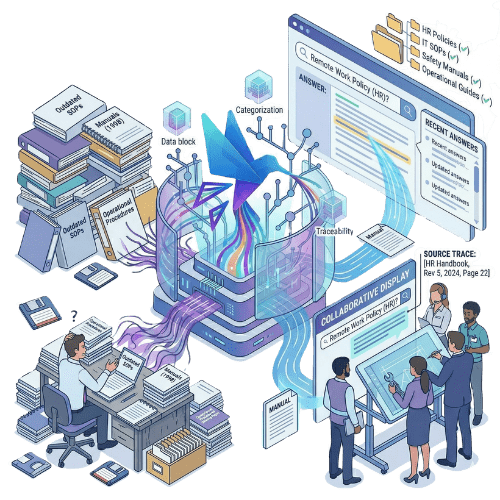
Doclarity helps teams organize trusted document libraries, search them with AI, verify sources and turn internal knowledge into answers, summaries and working documents.
Create controlled document spaces for PDFs, SOPs, reports, policies, manuals and internal files.
Search and answer from the documents your team has approved and uploaded.

Move from document storage to research, analysis, writing and collaboration.
Why it matters
Organizations already have the documents they need: policies, reports, procedures, SOPs, quality records, audit evidence, research files, manuals and internal archives. But the knowledge inside those documents is often hard to access. Teams search by file name, browse folders, ask colleagues, open long PDFs manually or rebuild answers from memory. Traditional document management helps with storage and organization. It does not always help teams understand, compare, verify and reuse the information inside the documents.
Doclarity gives teams a controlled document intelligence platform. Users can organize libraries, ask questions, retrieve relevant passages, verify sources and create deliverables from trusted files. The result is not a generic chatbot. It is a workspace where document-heavy teams can search, analyze and write from their own sources.
Capabilities
Organize files by workspace, team, topic, project, source, process or access level.
Find relevant information by meaning, not only by exact keywords.
Combine semantic search, keyword search and filters to improve precision.
Generate answers that can be traced back to the documents used.
Bring together evidence from several files to answer complex questions.
Open the original documents to verify important passages.
Turn source material into summaries, notes, responses, drafts or structured deliverables.
Use specialized agents for repeatable document work such as analysis, synthesis, comparison or drafting.
Collaborate on trusted libraries while keeping visibility aligned with permissions.
| Need | File storage | Knowledge base | Traditional DMS | Doclarity |
|---|---|---|---|---|
| Store files | Yes | Limited | Yes | Yes |
| Organize document libraries | Limited | Yes | Yes | Yes |
| Search by keyword | Limited | Yes | Yes | Yes |
| Search by meaning | No | Variable | Rarely | Yes |
| Ask questions to documents | No | Variable | Rarely | Yes |
| Generate sourced answers | No | Rarely | Rarely | Yes |
| Analyze multiple documents | No | Rarely | Rarely | Yes |
| Verify source passages | Limited | Variable | Limited | Yes |
| Create drafts from sources | No | Variable | No | Yes |
| Control document access | Limited | Variable | Yes | Yes |
Doclarity is not just a place to store documents. It is designed for teams that need to work from trusted sources: search, verify, synthesize, write and collaborate.
Teams need AI answers based on approved files, not uncontrolled web content.
Important information is buried inside long reports, annexes, manuals or archives.
Procedures, evidence, records and policies must be easy to find and verify.
Analysts need to compare documents, summarize findings and cite sources.
Users need quick answers from SOPs, manuals, policies and internal guides.
Teams must turn source material into notes, summaries, answers or working documents.
Workflow
Upload PDFs, DOCX files, reports, SOPs, policies, manuals, procedures or archives.
Organize documents by team, project, topic, process, source or access level.
Use semantic search or natural-language questions to retrieve relevant passages.
Review the documents and passages used before relying on an answer.
Turn document research into summaries, answers, notes, memos or structured drafts.
Use cases
Help teams find reliable answers inside policies, procedures, SOPs and reference documents.

Search procedures, evidence, records, audit materials and internal requirements.
Understand what a collection of reports, studies or publications says about a topic.
Make manuals, instructions, SOPs and internal guides easier to search and reuse.
Create memos, summaries, responses and structured drafts from verified sources.
Retrieve the documents, passages and evidence needed before an audit or internal review.
Teams
Doclarity is less suited if your main need is only file storage, electronic signature, invoice dematerialization, legal archiving or a full enterprise content management workflow.
 PDFs; reports; SOPs; policies; procedures; manuals; quality documents; audit evidence; research files; internal archives; regulatory or reference documents; documents that must be cited, checked or summarized.
 FAQ
A document intelligence platform helps teams search, analyze, verify and use information contained in documents. It goes beyond storage by making document content searchable, answerable and reusable.
A document management system usually focuses on storing, organizing, versioning and managing files. Doclarity focuses on exploiting the content inside those files through semantic search, sourced answers and document-based writing.
Doclarity can support internal knowledge work, but it is different from a traditional knowledge base. It works directly from document libraries such as PDFs, reports, SOPs, policies and procedures.
Yes. Doclarity is designed to answer questions using controlled document libraries available to the user.
Yes. Doclarity aims to connect answers back to the documents and passages used, so users can review the source material.
Doclarity can work with PDFs, DOCX files, reports, SOPs, policies, procedures, manuals, archives and other document formats depending on ingestion and extraction quality.
Yes. Doclarity is useful for teams that need to retrieve procedures, evidence, records, policies and source passages for quality, compliance or audit work.
Not necessarily. Doclarity can complement SharePoint or an existing document management system by adding AI search, sourced answers and document-based writing.
Solutions
Your documents already hold the knowledge your teams need. Doclarity helps them search it, verify it and turn it into useful work.
 Private Secure Sovereign